

CopperPay®

    A simpler way to manage your workers’ compensation payments.

    CopperPay allows you to pay your workers’ compensation premium as payroll is reported, so your payments stay aligned with how your business actually operates.

    Instead of paying based on estimated payroll and adjusting later, CopperPay calculates your premium throughout the policy term using your actual payroll each pay period.

    Why businesses choose CopperPay

    Running a business means managing cash flow, payroll, and expenses; all at once. CopperPay is designed to make one part of that easier.

    With CopperPay:

      • No down payment required

      • Premium adjusts as payroll is reported

      • Improve cash flow by aligning premium with payroll

      • Automatic premium payment

      • Payroll provider integration or self-reporting available

      • Helps reduce large adjustment at final audit 


    How this helps your business

    CopperPay is built to remove guesswork and reduce large swings in premium.

    Instead of catching up at the end of the policy term, your premium is calculated along the way—based on what actually happens in your business.

    That means:

    • Less risk of large additional premium at audit

    • Fewer unexpected refunds or adjustments

    • A more consistent and manageable payment experience


    How CopperPay works

    1. Report your payroll each pay period
      Either through an approved payroll provider or by entering it directly in the Audit1 portal

    2. Your premium is calculated automatically
      Based on the payroll you reported for that period

    3. Payment is made through ACH
      Keeping your payments consistent and on schedule

    4. This continues throughout your policy term
      So your premium stays aligned with your business activity


    Do I need a payroll provider?

    No. You can choose the option that works best for your business:

      • Use an approved payroll provider
        Payroll is reported automatically

      • Self-report payroll
        Enter payroll manually or upload it in the portal

    If you choose to self-report, you’ll receive reminders when payroll is due.


    What to expect at audit

    All workers’ compensation policies are still audited at the end of the policy term.

    The difference with CopperPay is that payroll is reported throughout the year, which helps reduce the likelihood of large adjustments at audit.

    Ready to get started?

    CopperPay is selected as new business or renewal. If you’re interested in using CopperPay, the next step is simple: 

     

    CopperPay_Image_v3


    Your agent will help you:
    • determine if it’s a good fit for your business

    • select CopperPay as your payment option

    • guide you through the next steps

    What happens after you enroll

    Once you have enrolled into CopperPay and after your policy is issued:

    CopperPay_Image2


    • You’ll receive a welcome email to complete setup

    • You’ll choose your reporting method and frequency

    • You’ll provide bank account information for ACH payments 

    Most businesses can complete setup in just a few minutes. 


    Learn More

    For more information and to get started, call us at 855.721.6342 or reach out to your CopperPoint agent or underwriter.

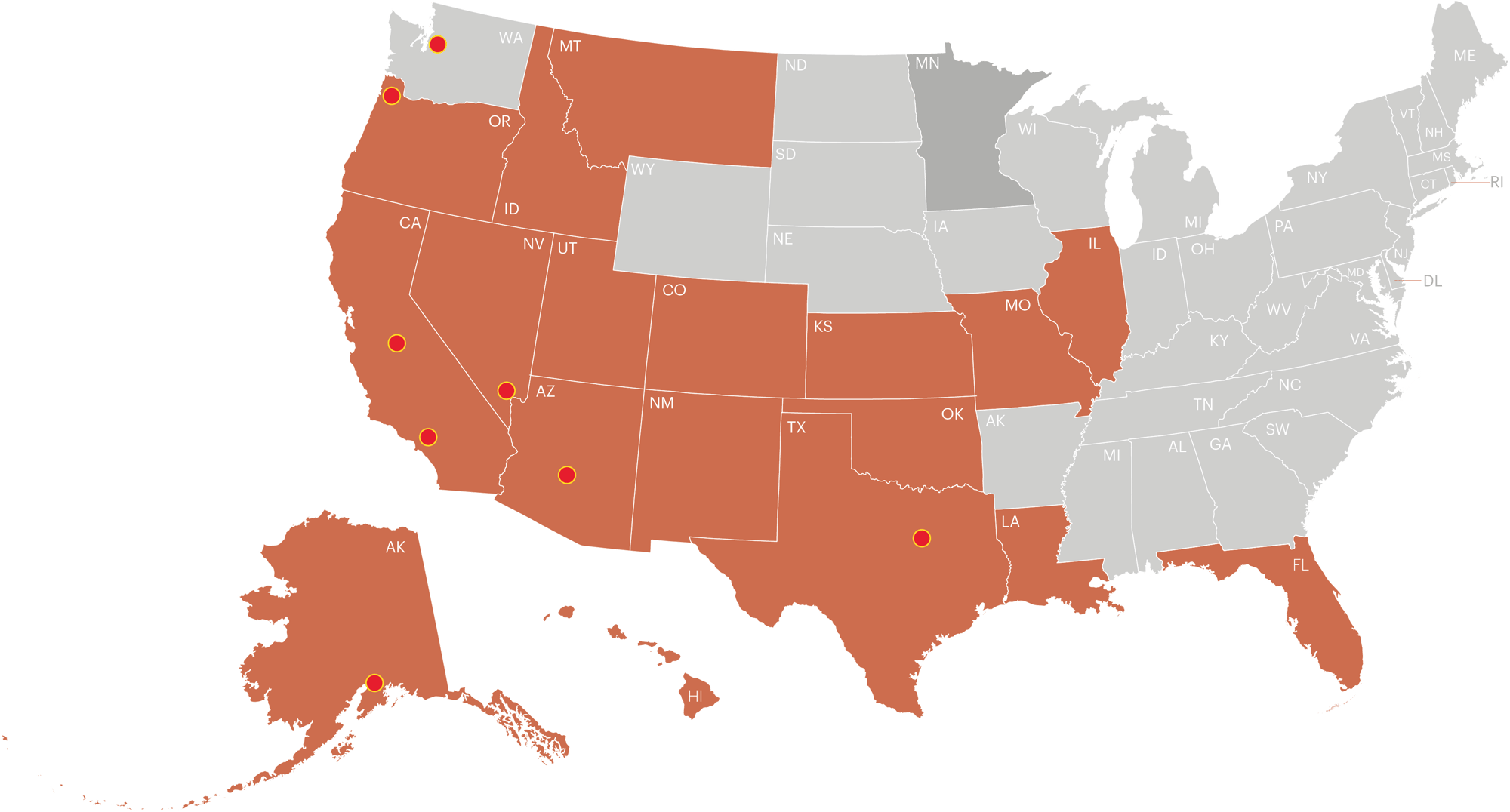
    CopperPayMap_2025

    CopperPay®
    Availability

    CopperPay® is currently available for all workers’ compensation policies in the following states:

    • Alaska
    • Arizona
    • California
    • Colorado
    • Florida
    • Hawaii
    • Idaho
    • Illinois
    • Kansas
    • Louisiana
    • Minnesota
    • Missouri
    • Montana
    • New Mexico
    • Nevada
    • Oklahoma
    • Oregon
    • Texas
    • Utah

    Helpful Resources

    Getting started with CopperPay

    Set up your account and complete enrollment after receiving your welcome email.

    How to enroll (PDF) 

    How to Report Payroll

    Learn how to report payroll if you choose to self-report.


    Have questions?

    If you have questions about CopperPay or need help getting started, our team is here to help.

    CopperPay FAQs

    What is CopperPay?

    CopperPay is CopperPoint’s pay-as-you-go workers’ compensation Payment option. Instead of paying premium based on estimated payroll, premium is calculated throughout the policy term using payroll reported each pay period. This keeps premium payments aligned with actual payroll, helping improve cash flow and reduce the likelihood of large adjustments at final audit.

    Who is eligible for CopperPay?

    CopperPay is available for all guaranteed cost workers’ compensation policies in the following states: AK, AZ, CA, CO, FL, HI, ID, IL, KS, LA, MN, MO, MT, NM, NV, OK, OR, TX, UT

    Why should a business consider CopperPay?

    With no down payment required, and premium calculated as payroll is reported, CopperPay can help improve cash flow by aligning premium with actual payroll. Additionally the Audit 1 platform allows for both flexible payroll reporting through an approved payroll provider or by self-reporting, as well as automated premium payments making the process for our Insured’s a simple way to manage their insurance.

     
    How does CopperPay work?

    CopperPay calculates workers’ compensation premium throughout the policy term using payroll reported each pay period. Businesses report payroll in one of two ways: Through an approved payroll provider that sends payroll information automatically, or by self-reporting payroll directly in the Audit1 portal. Once payroll is reported, the premium for that pay period is calculated and drafted via ACH.

     
    What frequency of payroll reporting is supported by CopperPay?

    CopperPay can support the reporting of payroll following the same frequency the business pays their employees; Weekly, Bi-weekly, Semi-monthly or Monthly.

    Does my business have to be a certain size to utilize CopperPay?

    No, CopperPay is available for all sized guaranteed cost workers’ compensation policies.

     
    How does a business enroll in CopperPay?

    To enroll in CopperPay, a business simply requests CopperPay billing through its agent and provides a primary contact name, email address, and phone number. After the policy is issued, the contact will receive a welcome email with a link to the CopperPay Audit1 portal to complete setup.


    During setup, the business will:

    • Accept the program terms and conditions

    • Choose a payroll reporting method and reporting frequency

    • Confirm any owners or officers included in the policy

    • Provide bank account information for ACH premium payments


    Most businesses can complete the setup process in just a few minutes.

     
    Do I need to use a payroll provider to participate in CopperPay?

    No. Businesses can report payroll through an approved payroll provider or report payroll directly in the CopperPay portal. For businesses that choose to self-report, email reminders are sent when payroll reports are due. Payroll can be entered manually or uploaded using a template, allowing payroll to be reported by employee or by workers’ compensation class code.

    How will I know if my payroll provider works with CopperPay?

    Hundreds of payroll providers already work with CopperPay. During the setup process, businesses can search for their payroll provider in a list of approved companies. If a payroll provider is not listed, the business can provide the payroll company’s name and a contact person so the CopperPay team can reach out about becoming approved. If payroll needs to be reported before the provider connection is completed, payroll can be self-reported in the portal to keep reporting up to date.

    What if my payroll provider does not work with CopperPay?

    While many payroll providers already work with CopperPay, some do not share payroll data with external systems. If a payroll provider does not integrate with CopperPay, payroll can still be reported by self-reporting in the CopperPay portal. Businesses may also choose to work with a third-party service that can report payroll on their behalf for a small fee.

     
    What happens if I change Payroll companies during the policy term?
    CopperPay is designed to support changes in payroll reporting during the policy term. If a business changes payroll providers, simply email copperpay@copperpoint.com for assistance. The team will help with the process.
    Are policies on CopperPay still audited?

    Yes. All workers’ compensation policies with CopperPoint are audited at the end of the policy term. Because payroll is reported throughout the year with CopperPay, much of the payroll information is already captured during the policy period. This helps reduce the likelihood of large additional premiums or return premiums at final audit.

    Who is Audit1?

    Audit1 is the third-party vendor CopperPoint partners with to support the CopperPay billing process, including payroll reporting and premium calculation.

    Can renewal policies be converted to CopperPay?

    Yes. Existing customers can request conversion to CopperPay prior to their policy renewal. Policies can be moved to CopperPay at renewal but cannot be converted during the policy term.

    Can policies be changed mid-term?

    No. In force policies cannot be converted to CopperPay mid-term. That change can only occur at renewal.

     
    How is my banking information secured?

    Bank account numbers are encrypted. Only the last 5 digits are visible.